
Automating Payments and CRM Sync Using Zapier, HubSpot, and Stripe
Overview
A growing digital business approached NexaSolutionHub because they were struggling to manage customer payments and lead data across multiple platforms. They were using Stripe for payments and HubSpot as their CRM, but both systems were operating independently. Every time a customer made a payment, the team had to manually update records in HubSpot. This process was time-consuming, error-prone, and difficult to scale. The business needed a seamless system that could automatically connect payments with customer data.
The Challenge
The main challenge was the lack of integration between Stripe and HubSpot. When a customer completed a payment, there was no automatic way to reflect that transaction inside the CRM. Team members had to manually create or update contacts, which often led to delays and data inconsistencies. Important customer information was sometimes missed or duplicated. This created confusion in tracking active customers and revenue. The manual process also limited the business’s ability to scale efficiently.
Our Objectives
The primary objective was to build an automated system that would instantly sync payment data from Stripe into HubSpot. The business wanted every new payment to automatically create or update a contact in the CRM. They also needed a way to track customer status based on payment activity. Another goal was to eliminate manual data entry and reduce errors. The system needed to be reliable, scalable, and easy to manage.
Strategy
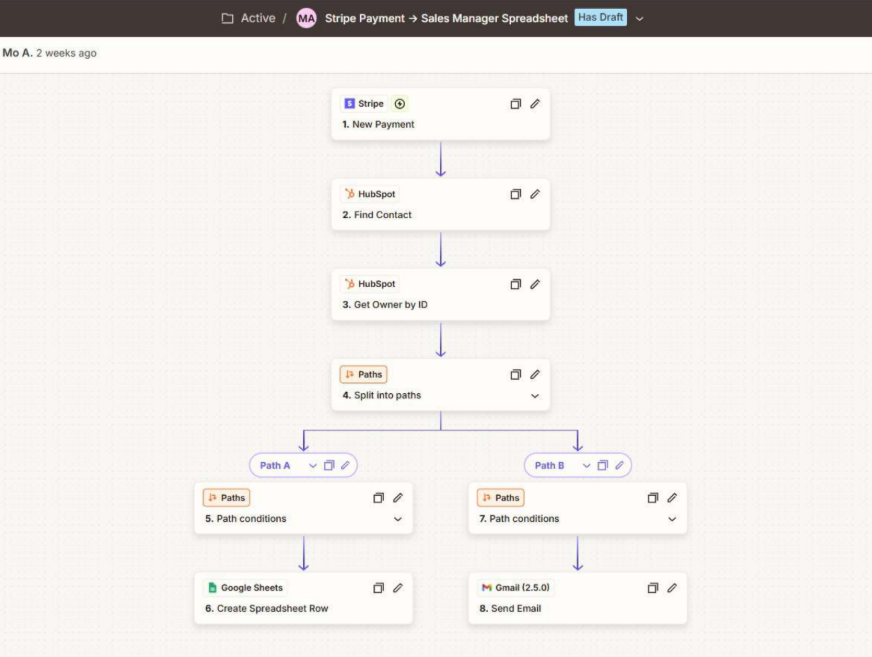
NexaSolutionHub designed a complete automation workflow using Zapier to connect Stripe and HubSpot. Zapier acted as the bridge between the payment system and the CRM.
The automation was triggered whenever a successful payment was recorded in Stripe. As soon as a transaction occurred, Zapier captured the customer’s payment data, including name, email, and transaction details.
The system then checked whether the customer already existed in HubSpot. If the contact was new, a new record was automatically created. If the contact already existed, their profile was updated with the latest payment information.
Custom properties were configured inside HubSpot to store payment status, transaction amount, and purchase details. This allowed the business to track customer activity directly inside the CRM.
To improve visibility, workflows were also created inside HubSpot to segment customers based on payment behavior. This helped the team identify active customers, new buyers, and repeat clients.
The entire system was tested to ensure data accuracy and reliability. Adjustments were made to handle edge cases such as duplicate entries and failed transactions.
Automation Workflow Structure
✅ Customer completes payment in Stripe
✅ Zapier detects successful transaction
✅ Customer data captured automatically
✅ Zapier checks existing contact in HubSpot
✅ New contact created or existing contact updated
✅ Payment details stored in CRM
✅ Customer status updated based on transaction
System Integration Flow
✅ Stripe processes payment
✅ Zapier triggers automation
✅ HubSpot updates customer record
✅ CRM reflects real-time payment data
Conclusions
By integrating Stripe and HubSpot through Zapier, NexaSolutionHub eliminated the need for manual data entry and created a seamless connection between payments and customer management. The business now has a centralized system where every transaction is automatically recorded and tracked. This improved operational efficiency and allowed the team to focus on growth rather than administrative tasks.
Results
✅ Payment data is now synced instantly with the CRM
✅ Manual work has been completely reduced
✅ Customer records are accurate and up to date
✅ The team has better visibility into revenue and customer activity
✅ The system supports scalable growth without additional effort
Key Tools Used
✅ Zapier
✅ HubSpot
✅ Stripe
Do you want to Transform your brand into a future powerhouse? It’s time to kick things off.